


NOAA Weather Unofficial
4.735.84K Reviews
App Specs
- Version
- 2.18.1
- Updated On
- License
- Free
- Downloads
- 1,000,000+
- Developer
- Granite Apps
- Categories
- Weather
- Platform
- Android
Screenshots
 Analysis by AppCompare
Weather apps are a dime a dozen these days, but every once in a while, one comes along that makes you sit up and take notice. That's exactly what happened to me with the NOAA Weather Unofficial app. As someone who relies on accurate weather forecasts to plan my day-to-day activities, I found myself drawn to the detailed information and user-friendly interface this app promises. Let me walk you through my experience with it.
How the app fits into a daily routine
I find a weather app most useful when it helps answer a practical question quickly: should I leave earlier, take a jacket, or move an outdoor plan indoors? NOAA Weather Unofficial is best approached as a focused forecast tool rather than a broad lifestyle dashboard. Its NOAA-based outlook and radar make it especially appealing if you want to check conditions around a particular place instead of relying only on a general forecast for a city.
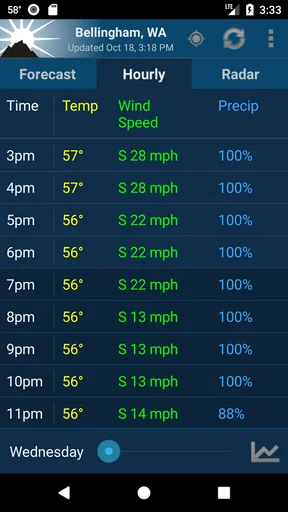
A realistic use is checking the hourly view before a walk or commute, then opening the radar if the sky looks unsettled. The two views serve different purposes: the forecast helps with timing, while the map gives a visual sense of approaching weather. I would not treat a radar image as a promise about exactly when rain will reach my street, but it can help me decide whether to carry an umbrella or wait before setting out.
Who is likely to appreciate it
This app makes the most sense for people who want local weather information presented without a lot of unrelated content. If you regularly check conditions for home and a few other places, the saved-location option can make those checks easier. It can also suit people who like looking at radar rather than reading only a brief sentence about the forecast.
It is less compelling for someone who wants a polished all-in-one weather experience with extensive lifestyle extras, or who mainly needs a quick glance at a simple temperature card. In that case, the weather widget or built-in weather app already on a phone may be enough. NOAA Weather Unofficial is worth considering when forecasts, map context, and location-based checks are central to how you plan.
First Impressions Matter
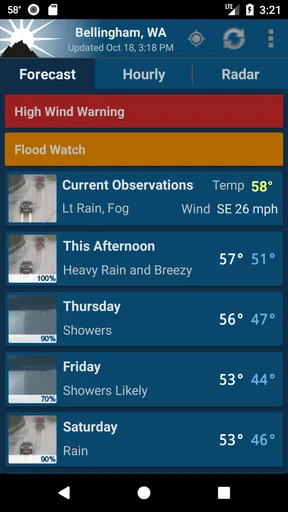
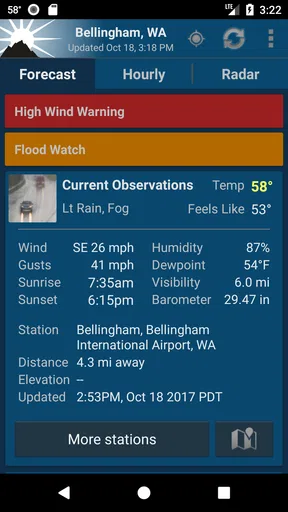
When I first opened the NOAA Weather Unofficial app, I was greeted by a clean and straightforward interface. No unnecessary bells and whistles, just the info you need right when you need it. The home screen presents current weather conditions front and center, with temperature, humidity, wind speed, and more, all neatly laid out. It’s like having a mini meteorologist in your pocket!
One thing that stood out to me was how quickly the app loaded. No one wants to be stuck waiting for updates, especially when you're trying to dodge a rainstorm.
Worth Reading Before You Choose

EA SPORTS FC Mobile 26 Is a Bigger Football Game, but It Takes Time

Flipboard Shows What News Apps Must Do Beyond the Feed

Switching to Android Auto Means Rethinking Your Driving Routine

Google Calendar Makes a Crowded Week Easier to Manage

Ludo King Makes the Most of the Minutes Between Plans

Baby Panda World Brings Quick Play to Modern Phones, but Its Game Library Feels Busy
Using forecasts, radar, and alerts together
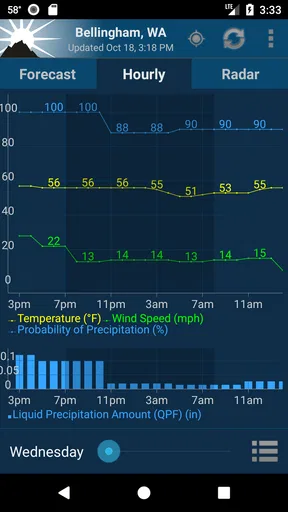
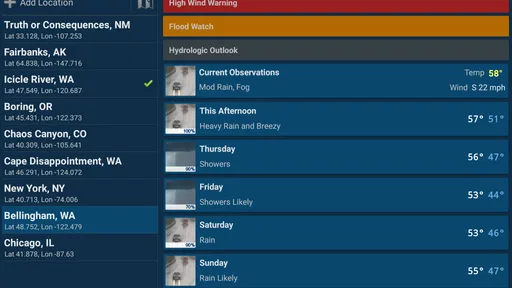
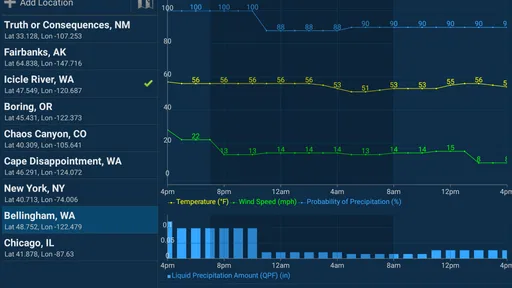
Now, onto the features. The app provides detailed forecasts that range from hourly to weekly overviews. The hourly forecasts are particularly handy for planning those spontaneous outdoor activities. You get a clear view of when the weather might take a turn, which is super helpful.
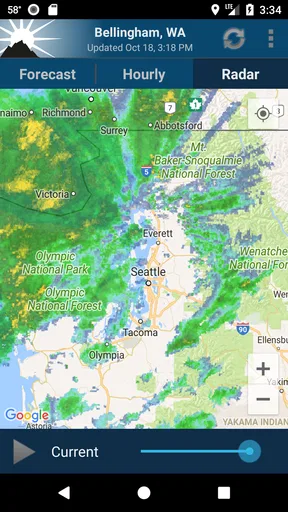
One of the standout features for me is the radar map. It’s interactive and allows you to zoom in and out to see weather patterns in real time. The radar is surprisingly detailed, offering different layers such as precipitation, cloud cover, and even wind direction. It's fascinating to use, even if you’re not a weather enthusiast.
For a better decision, I would compare the hourly forecast with the radar instead of relying on either alone. If rain appears on the map, the forecast can help put that visual into a time-based plan; if the two seem to disagree, I would keep checking rather than assume one is exact. This is a useful habit for outdoor plans, where a broad regional pattern and conditions at a specific location may not line up perfectly.
Another gem is the weather alerts feature. The app pushes notifications for severe weather updates, which can be a lifesaver. Whether it's a thunderstorm or a heatwave, knowing in advance can help you make better decisions.
What to expect from notifications
Alerts are most valuable when I treat them as a prompt to pay attention, not as a substitute for judgment. A notification can tell me that conditions deserve a closer look; I still need to consider where I am, what I plan to do, and whether the situation has changed. For important plans, checking the app before leaving is more useful than assuming a previous alert or forecast remains current.
There is also a practical balance to strike with notifications. If severe-weather prompts are useful to you, they can add reassurance during unsettled conditions. If you prefer a quiet phone, alerts may feel intrusive, so it is sensible to decide whether they suit your routine and review the app’s available settings. I would keep essential safety alerts enabled where possible, while avoiding unnecessary interruptions if the app offers controls for them.
Making the setup work for you
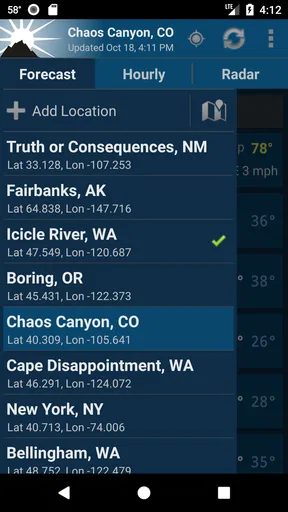
Customization is where the app really shines. You can set your home location, add multiple locations, and even customize the units of measurement. For someone like me who likes everything just so, this is a big win. The app also offers different display themes, allowing you to switch up the look to match your mood or needs.
For people who travel between home, work, and family, saved locations can be more useful than repeatedly searching for a place. A small tip: give your locations names that make sense to you, if the app allows it, so you can quickly distinguish them when checking several forecasts. Also set the measurement units before relying on the numbers; switching between units mid-check can create avoidable confusion when you are making a quick decision.
Using the app feels intuitive. The navigation is smooth, and the information is presented in a way that makes sense, even if you’re not a weather geek. Plus, there are little touches, like background images that change with the weather, which add to the overall experience without being distracting.
Where it differs from other weather apps
Compared with the usual alternatives, NOAA Weather Unofficial puts the emphasis on forecasts and radar rather than turning weather into a feed of extra content. That focus can be a benefit when I want to check conditions and get on with my day. A general-purpose weather app may be more convenient for someone who values a highly visual overview, bundled news, or lots of lifestyle details in one place. A minimal built-in app may win for sheer speed if all I need is today’s temperature.
The trade-off is that a focused interface still asks me to interpret the information. A radar map is useful, but it is not the same as a personal guarantee about what will happen at my exact address. Weather can vary over a short distance, and forecasts are guidance rather than certainty. I would use this app to make better-informed plans, not to make safety-critical decisions from one screen alone.
Current state and product history
Granite Apps has maintained this weather app since its release on February 26, 2012, and the current version is 2.16.2. That long-running presence suggests an established product, but the version number by itself does not tell me which features changed or how the interface has evolved. I prefer to separate what is clear today—the app’s forecast, radar, location, and alert tools—from any expectation that future updates will add particular capabilities.
For existing users, the practical question is whether the current experience still fits their routine. If you already use saved locations, customized units, and radar checks, those are the parts to reassess after an update: confirm that your usual places and preferences remain useful, and check that alerts match how you want to be notified. I would not assume a change in version means a dramatic redesign; the most meaningful measure is whether the app continues to make everyday weather decisions easier.
Limitations worth keeping in mind
The app’s strengths do not remove the usual limits of forecasting. A weekly view is helpful for spotting broad patterns, but I would be cautious about treating a distant forecast as fixed when planning something that depends on precise conditions. I would check closer to the day, then use the hourly view and radar to refine the plan. That extra check is a small effort, but it is more sensible than building a schedule around a prediction that may shift.
There is also a learning curve in deciding which screen answers which question. Someone who only wants a single glance may find forecast details and map layers more than they need. Conversely, a weather enthusiast looking for highly specialized analysis may want a more technical tool. The app occupies a useful middle ground: more involved than a basic temperature display, yet still approachable for ordinary planning.
Price, access, and who should skip it
The app is free, rated for Everyone, and has a 4.7 average from around 106,000 ratings. More than a million installs show that many people have tried it, though popularity alone does not make it the right fit for every phone or routine. It supports Android 4.4 and later, which gives it a broad range of compatibility among Android devices.
I would recommend giving it a try if you want NOAA-focused weather information, like checking conditions for more than one place, or find radar useful when deciding whether to change plans. I would skip it if you want a minimal screen with no extra detail, prefer a different source for forecasts, or need a specialized professional weather tool. In those cases, a simpler built-in option or a more technical alternative may suit you better.
What I would watch going forward
When considering any future version, I would look for clear improvements that make the core tasks easier: checking a location, understanding the forecast, reading the radar, and managing alerts. Those are the parts that matter most to my day-to-day use. I would judge changes by whether they improve clarity and reliability, not simply by the appearance of a new version number.
Wrapping It Up
In the grand scheme of weather apps, NOAA Weather Unofficial is a breath of fresh air. It combines functionality with simplicity, making it a must-have for anyone who likes to stay one step ahead of the weather. Whether you're planning a weekend getaway or just want to know if you need an umbrella for the day, this app has got you covered.
So, if you’re on the lookout for a reliable, no-nonsense weather app that delivers accurate forecasts and real-time updates, give NOAA Weather Unofficial a try. It might just become your go-to weather companion.
Pros
- Accurate weather forecasts and updates.
- Customizable alerts for severe weather.
- Interactive radar with real-time data.
- Ad-free experience for premium users.
- Detailed hourly and weekly forecasts.
Cons
- Occasional issues with app loading.
- Limited features in the free version.
- Premium version is relatively costly.
- Frequent notifications for minor alerts.
- UI can be confusing for new users.
FAQs for NOAA Weather Unofficial
What features does the NOAA Weather Unofficial app offer?
The NOAA Weather Unofficial app provides users with real-time weather updates, including detailed forecasts, radar images, and alerts. It offers features like hourly forecasts, extended 7-day outlooks, and customizable notifications for weather changes. Users can also access detailed information on wind speed, humidity, and precipitation levels, making it a comprehensive tool for weather tracking.
Is the NOAA Weather Unofficial app free to use?
The NOAA Weather Unofficial app offers a free version with basic features. However, to unlock advanced functionalities such as ad-free browsing and customizable alerts, users may opt for in-app purchases or a premium subscription. This provides a more enhanced experience for those needing detailed weather insights.
How accurate are the weather forecasts provided by the app?
The NOAA Weather Unofficial app sources its data directly from the National Oceanic and Atmospheric Administration, ensuring high accuracy and reliability. While no weather forecast can be 100% accurate due to the unpredictability of weather systems, the app provides up-to-date and precise information based on the latest meteorological data.
Does the app work offline or require an internet connection?
The NOAA Weather Unofficial app requires an internet connection to deliver real-time weather data and updates. While some previously loaded data may be accessible offline, for the most accurate and current information, a stable internet connection is necessary. This ensures users receive the latest alerts and forecasts.
Can I customize the alerts and notifications in the app?
Yes, the NOAA Weather Unofficial app allows users to customize alerts and notifications according to their preferences. Users can set alerts for specific weather conditions, such as severe weather warnings or temperature changes. This feature helps users stay informed about weather conditions that may affect their daily activities.


